
Understanding Applicants
Overview
Applicants are creators who have not been added to Creators or Prospects yet and have applied through one of your Landing Pages. Once creators apply through your Landing Page, their contact information, socials, and any other information they provided when they applied will appear in your Applicants table.
From here, you can accept Applicants as Creators or Prospects and add them to your Contacts, or you can decline applicants and hide them from the table view. For more information on accepting applicants, check out our help article Accepting Your Applicants.
How to Do It
To access your applicants, navigate to Contacts > Applicants. This will open the Applicants table, which has basic tools including Filter, Search, Views, Export, and Columns.

You can also take various actions with applicants via Row Actions and Bulk Actions:

Row Actions: Hover over an applicant to show individual actions: View Content, Accept, and Decline.
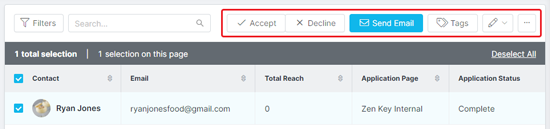
Bulk Actions: Click the checkbox next to one or more applicants to display bulk actions: Accept, Decline, Send Email, Tags, Edit (Change Owner, Set Custom Property, Set Relationship Stage), and More Options (Export, Delete).
Warning: If you delete an Applicant, they will be permanently removed and cannot be recovered.