
Bank Transfer Transition: FAQ
Bank Transfer is the only way to receive a payout through GRIN. PayPal was removed on March 2, 2026. If your bank account is not on file yet, add it with the steps below.
How to add Bank Transfer
Log in to your creator portal (your Live Site).
Open the Payouts tab.
Select + Add Payment Method, then choose Bank Transfer.
Select your country. This decides the currency, and any conversion, used to deposit the money.
Enter your bank account details:
Full account holder name (no initials)
Bank account number or IBAN
Routing, BIC, or SWIFT, if the form asks for it
Address in Roman characters (required everywhere)
Save your details.
Make sure Bank Transfer shows as your Active payout method.
PayPal is no longer a payout method. After you save, Bank Transfer should show as Active.
If you see an error or a payment fails
If a payment fails, you will be notified by Support@grin.co with a reason and the steps to resolve it.
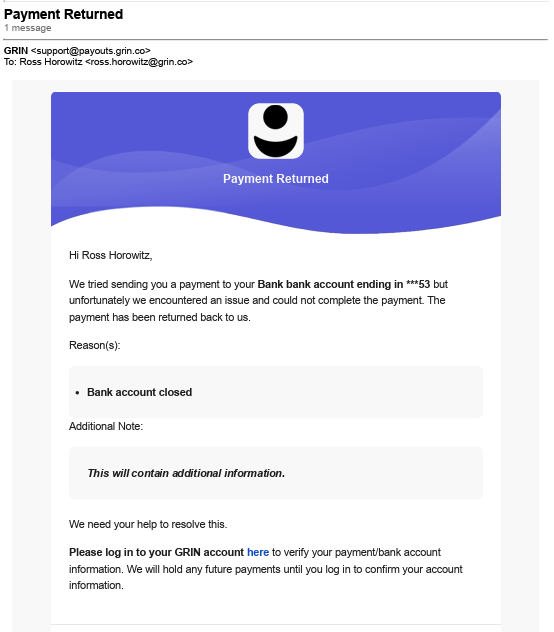
If more verification is required, you will receive a secure request from our compliance partner asking for clarification or documents, such as proof of address or an ID. You will receive an email from Support@grin.co that says what to do.
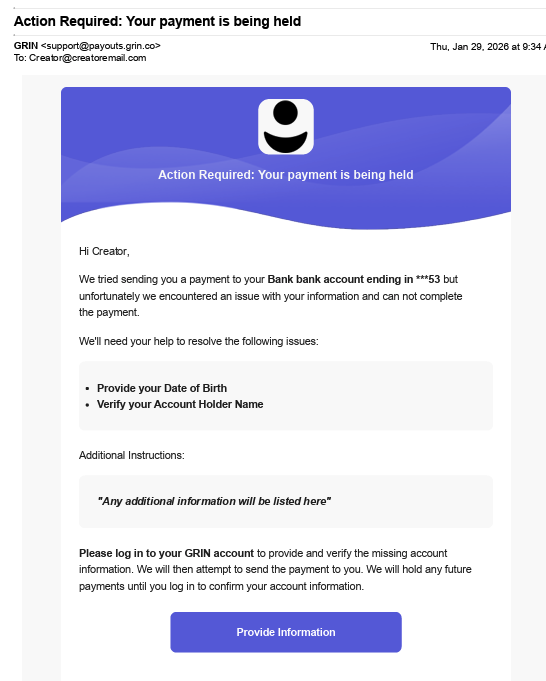
Some common issues include:
Invalid account number
IBAN required
Missing date of birth
Recipient or bank address incomplete
Account holder name contains initials
Company name listed on an individual profile
Fees and how long a payment takes
GRIN currently covers the fees for brands when they send a bank transfer to a creator.
A payment from USD to USD has no fee for the brand or the creator, unless it is a USD to USD SWIFT wire. In that case your bank may charge a landing fee.
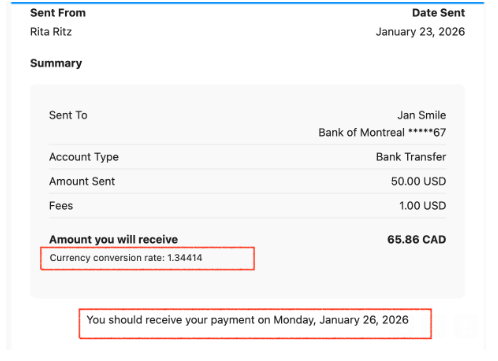
A payment in another currency uses an exchange rate, which can include a 2% margin. You will see the rate used to convert the payout from USD to your currency.
You will receive a payment confirmation email with the exchange rate and a timeline for when you can expect the money.
PayPal is no longer available
PayPal was removed as a payout method on March 2, 2026.
Bank Transfer is the only way to receive a payout.
If a payment was waiting on PayPal, add your bank details and ask the brand to send it again.