
Creating an Email Sequence
Overview
Email Sequences are email chains that send follow-up emails to creators based on their actions. This means creators added to a sequence will continue to receive sequenced emails until they take a specific action or the chain ends, which makes outreach automated and convenient. You can learn how to set up sequences in this article.
What You'll Need
A connected email on your Integrations page. To learn more, you can visit Integrating Your Email.
Existing Templates if you want to use them in your sequence. Learn more with Templates.
An existing Activation if you would like to attach the sequence to one. Learn more with Creating an Activation.
How to Do It
Navigate to Messages > Sequences and click Create.
In Step 1. Sequence Basics, fill out the Name and optionally attach to a Program (Activation).
In Step 2. Sequence Emails, fill out the Subject and Body for your first email. Use Variables and Templates for more flexibility.
Click Add a follow-up to compose the next email in the sequence.
In your follow-up email, set the Send this email after delay, choose the Don't send if we receive conditions, and compose the body.
Repeat Steps 4 and 5 for as many follow-up emails as you want.
Click Save.
Using Variables
Variables are snippets that update automatically in the email based on the creator you're sending the email to or the account user you're sending from.
You can use variables by selecting the Insert tool in the text body editor and selecting a variable from the list that appears. You can also use variables in the email's subject line.
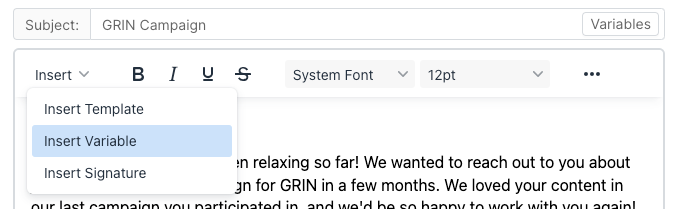
Click Insert Variable to insert them in your template.
Conclusion
Your sequence is now ready to use!