
Managing Email Sequences
You can manage and organize your sequences from your Sequences page. It's particularly important to regularly refresh, update, and delete any unused sequences so you can stay within your GRIN account's sequences limit. You can learn how to do so in this article.
What You'll Need
An existing email template. To learn more, you can visit Creating an Email Sequence.
How to Do It
You can access your sequences from Messages > Sequences. From here, you can manage your Active sequences and your Archived sequences.
Active Sequences
Active sequences are for sequences you're currently using. Row actions include: Show Stats, Pause/Resume, Contacts, and More Options (Edit, Archive, Duplicate, Delete).

Use row actions to manage your sequences.
Bulk actions include: Archive, Pause, and Delete.
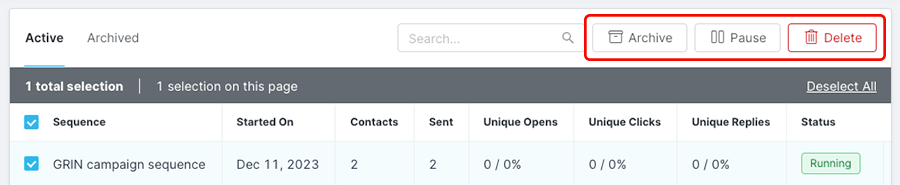
Use bulk actions to manage multiple sequences.
Archived Sequences
Archived sequences are sequences that you are not currently using but may want to reenable later. Row actions include: Restore and Delete.

Use row actions to manage your archived sequences.
Bulk actions for archived sequences include: Restore and Delete.
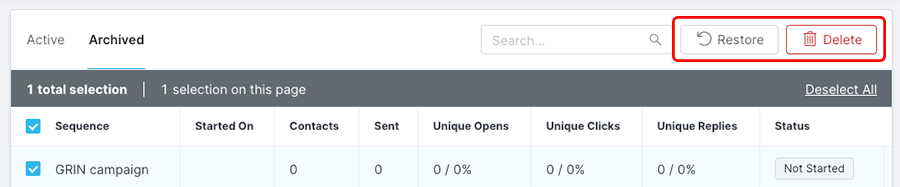
Use bulk actions to manage multiple archived sequences.