
Creating Commission Tiers
Overview
Commission Tiers is a way to manage your payments to creators based on their total conversion revenue made with their affiliate links. These commissions increase when your creators meet sales thresholds, or Tiers, you configure. This means you can easily reward your high-performing creators with greater commission automatically.
Commission Tiers can be configured wherever you can create or edit affiliate link groups, which are:
Brands, including:
Affiliate link group settings
Creators’ individually generated link settings
Activations
Creators’ contact profiles
Once you create your commission tiers, you can view which tier your creators are in and how much revenue they need to make to reach the tier. For more information on how Commission Tiers work, check out our FAQ.
What You'll Need
A configured Brand with an affiliate link group. For more information on setting up a Brand with an affiliate link group, check out our help article.
How to Do It
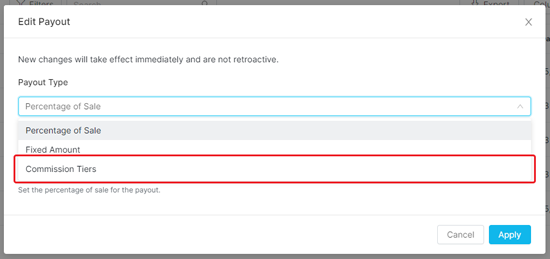
1. Select Commission Tiers as your Payout Type.
2. Enter your first commission tiers:
Tier Name: The name of that tier.
Exceeds Sales Amount: The minimum amount of sales your creator needs to make before they start earning the commission you set in this tier. You can set this amount to 0 if you want to pay out all your creators regardless of their sales revenue so far.
Commission Payout: The amount and type of payout you want to reward your creators when they enter that tier. Click the Payout Type to change between types.
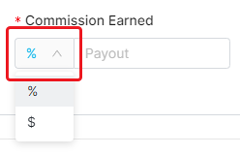
The types of payouts are:
Percentage of Sale: a percent to payout your creator based on the total sale amount of purchases made through their affiliate link.
Fixed Amount: a fixed amount to payout your creator for purchases made through their affiliate link.
3. Click Add Tier to add another tier, if needed.
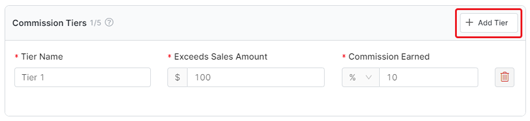
Note: You can remove a commission tier at any time by clicking the Delete icon next to it. However, you must always have at least one tier.
4. Fill in all the fields described in Step 2.
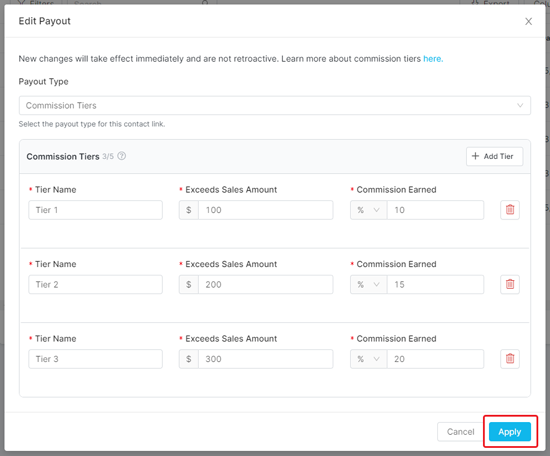
5. Repeat Steps 3-4 until you have as many commission tiers as you want. You can have a maximum of five unique tiers.
6. Click Apply once you’ve created all the tiers you need.
Conclusion
That’s it! Your affiliate link group has now been updated with commission tiers. Now, whenever your creators earn revenue with their unique affiliate links, they’ll automatically receive a commission based on the tier they’re in.
Once they earn enough revenue from sales, they’ll be moved into the next commission tier based on your sales minimums automatically.