
Reporting and Performance Insights
The Affiliate Hub provides high-level reporting on your affiliate program and reporting on individual creator performance.
High-Level Reporting in the Affiliate Hub

Revenue: Total revenue generated by affiliates.
Approved Creators: Number of creators approved as an affiliate in your program. This will equal the number of creators in the Approved tab of the Affiliate Hub.
Conversions: Total number of sales driven by creator affiliate links and codes.
Commission Payments: Total amount of commissions paid to affiliates.
Creator Reporting
The affiliate hub also provides more detailed reporting for individual creators/affiliates.
Approved Tab
The Approved tab of the Affiliate Hub contains columns that report on the individual creator's performance regarding:
Total Revenue
Total Conversions

Individual Creator View
Clicking on a creator in the Approved tab will open up a side panel view. There are two tabs in this view that contain the creator's performance as an affiliate:
Affiliate Codes and Links
This tab lists out the codes and links assigned to a creator.
Affiliate Links Section
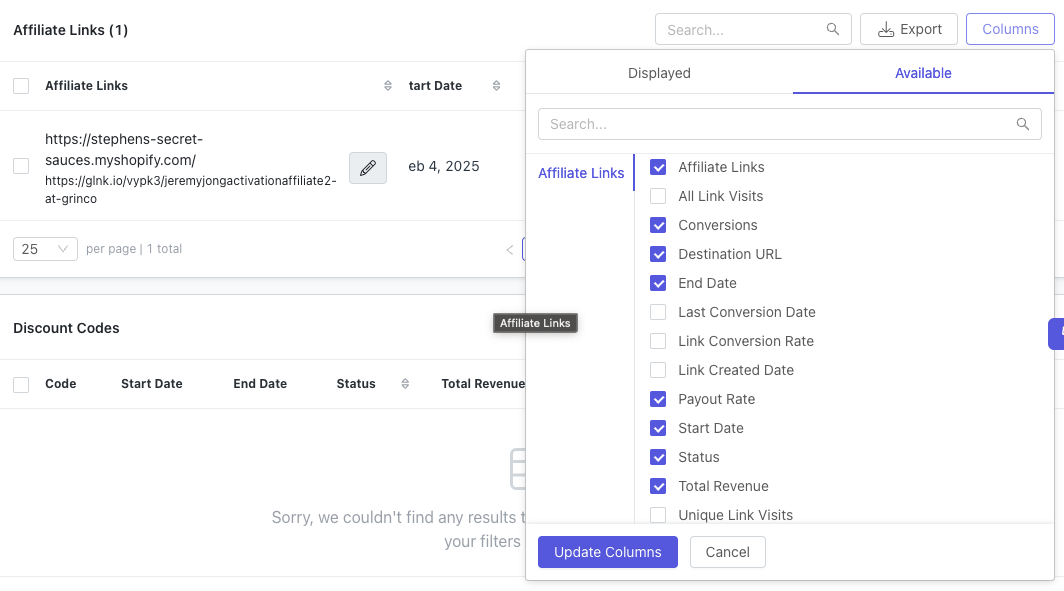
The Affiliate Links section will contain the following metrics in the columns:
All Link Visits
Conversions
Total Revenue
Unique Link Visits
If you don't see these columns, click on the Columns button in the top-right corner to select these columns for display.
Discount Codes Section
The Discount Codes section will contain the following metrics in the columns:
Total Conversions
Total Revenue
If you don't see these columns, click on the Columns button in the top-right corner to select these columns for display.